> ## Documentation Index
> Fetch the complete documentation index at: https://teardowns.aero/docs/llms.txt
> Use this file to discover all available pages before exploring further.
# API keys
> How keys are minted, used, rotated, and revoked.
API keys are the credential your ERP carries on every public-API call.
They are minted, managed, and revoked by your organization itself
nobody at Teardowns.aero issues them on your behalf.
## Anatomy of a key
```
tdao_live_4heb622mfcousggcescrp4d7xlwslr4w
└──┬───┘ └─────────────────┬──────────────┘
prefix 32 base32 characters (~160 bits)
```
* **Prefix `tdao_live_`** fixed. Helps secret-scanning tools (GitHub,
GitLab, `git-secrets`) detect leaks. Future scopes ("test\_",
"preprod\_") may appear; you can ignore those for now.
* **Body** 32 base32 characters drawn from a CSPRNG. The math says
the probability of two keys ever colliding is approximately zero;
a UNIQUE index on the hash is the backup guarantee.
* **Length** 42 characters total.
## What a key carries
A key encodes only:
* The organization that minted it (matched against your
`X-Organization-Id` on every request).
* The user who clicked "Generate" (re-checked on every request if
they're deactivated, the key starts failing immediately).
* A label you chose (for your own bookkeeping never sent to the
partner-facing surface).
Capabilities are NOT frozen at mint time. They're re-read from the
creator's record on every request. So if a member who minted a key
loses their `seller` capability, their key stops working for endpoints
that need it.
## Who can mint
| Role | Can mint? |
| ------------------------------- | --------- |
| Org admin | Yes |
| Member with `seller` capability | Yes |
| Member with only `advertiser` | No |
| Member with only `buyer` | No |
| Member with no capabilities | No |
Teardowns.aero can also disable API access entirely for an org via the
per-org **API access**. When the access is disabled, the **Settings
→ API Access** page disappears from the web app and any existing keys
for that org fail at request time with `403 api_access_disabled`.
## Lifecycle operations
Every operation is self-serve from the **Settings → API Access** page
in the web app. Creating or managing API keys requires an authenticated user session, one API key can't issue another.
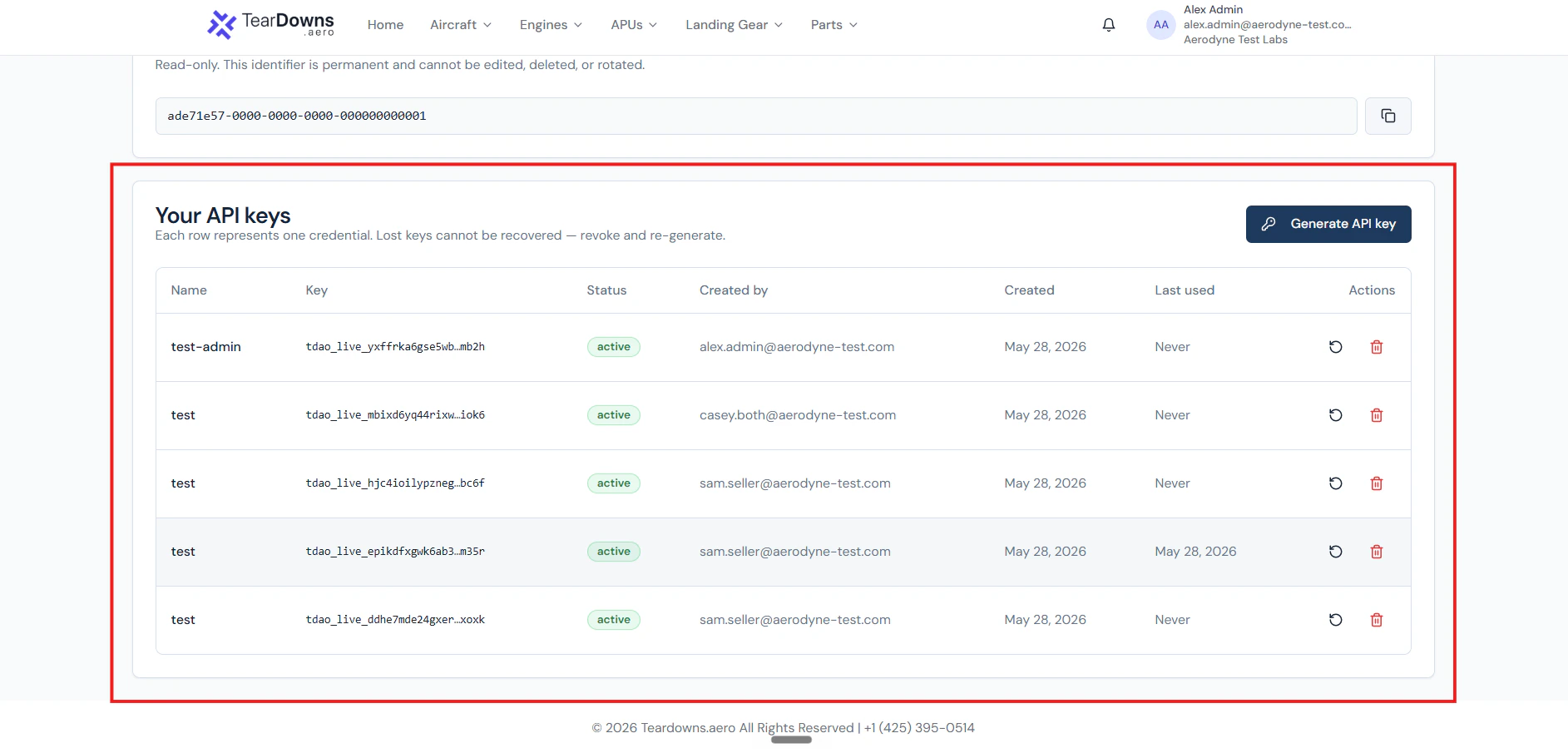 Click "Generate API key", give it a label. The raw value is shown
**once** in a modal. Copy it immediately to your secrets store.
The web app walks you through four screens. Every state below is a
pop-up rendered on the API Access page.
**1. Hit the "Generate API key" button.**
Click "Generate API key", give it a label. The raw value is shown
**once** in a modal. Copy it immediately to your secrets store.
The web app walks you through four screens. Every state below is a
pop-up rendered on the API Access page.
**1. Hit the "Generate API key" button.**
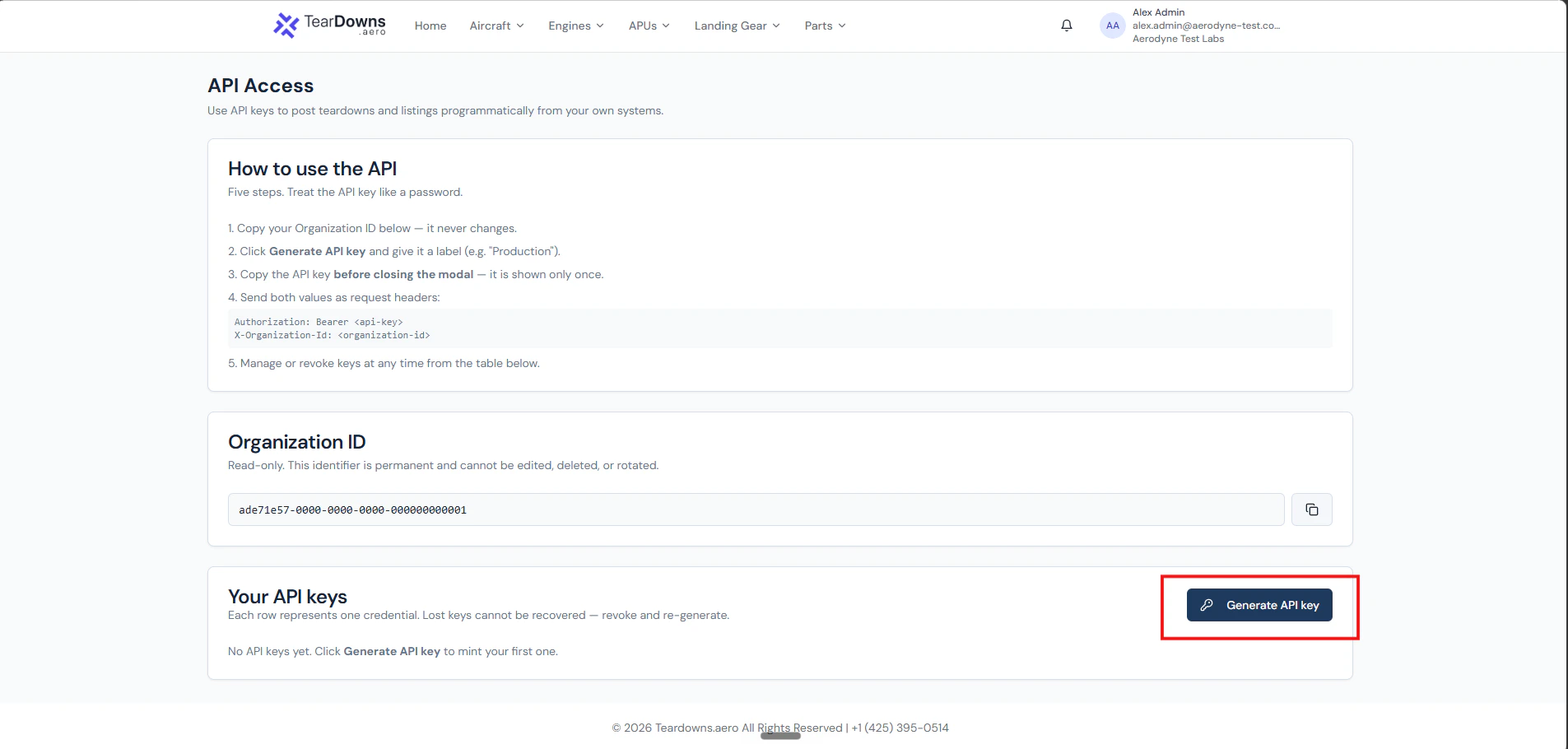 **2. Name the key in the "Create API key" pop-up.**
Pick a label that uniquely identifies this integration ("Production
ERP", "Staging sync", "Finance reconciliation job"). The label is
for your own bookkeeping, your partners never see it.
**2. Name the key in the "Create API key" pop-up.**
Pick a label that uniquely identifies this integration ("Production
ERP", "Staging sync", "Finance reconciliation job"). The label is
for your own bookkeeping, your partners never see it.
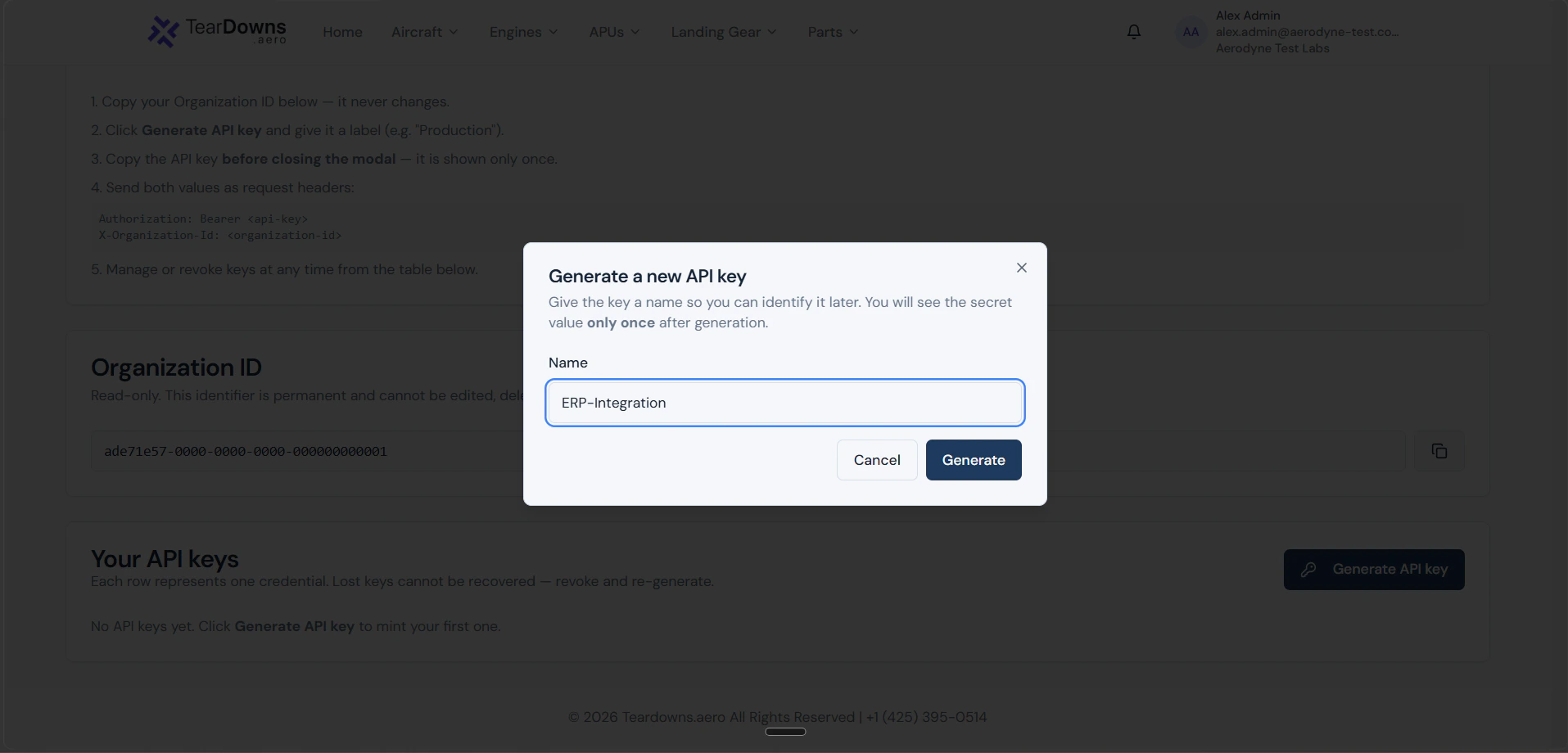 **3. Copy the secret from the reveal pop-up. This is the only time it appears.**
The next pop-up shows the raw `tdao_live_…` value plus the
Organization ID side-by-side. There is a copy-to-clipboard button on
the secret. **Copy it now**, paste into your secrets manager. Closing
this modal without copying means the key is gone, your only option
is to revoke it and mint a fresh one.
**3. Copy the secret from the reveal pop-up. This is the only time it appears.**
The next pop-up shows the raw `tdao_live_…` value plus the
Organization ID side-by-side. There is a copy-to-clipboard button on
the secret. **Copy it now**, paste into your secrets manager. Closing
this modal without copying means the key is gone, your only option
is to revoke it and mint a fresh one.
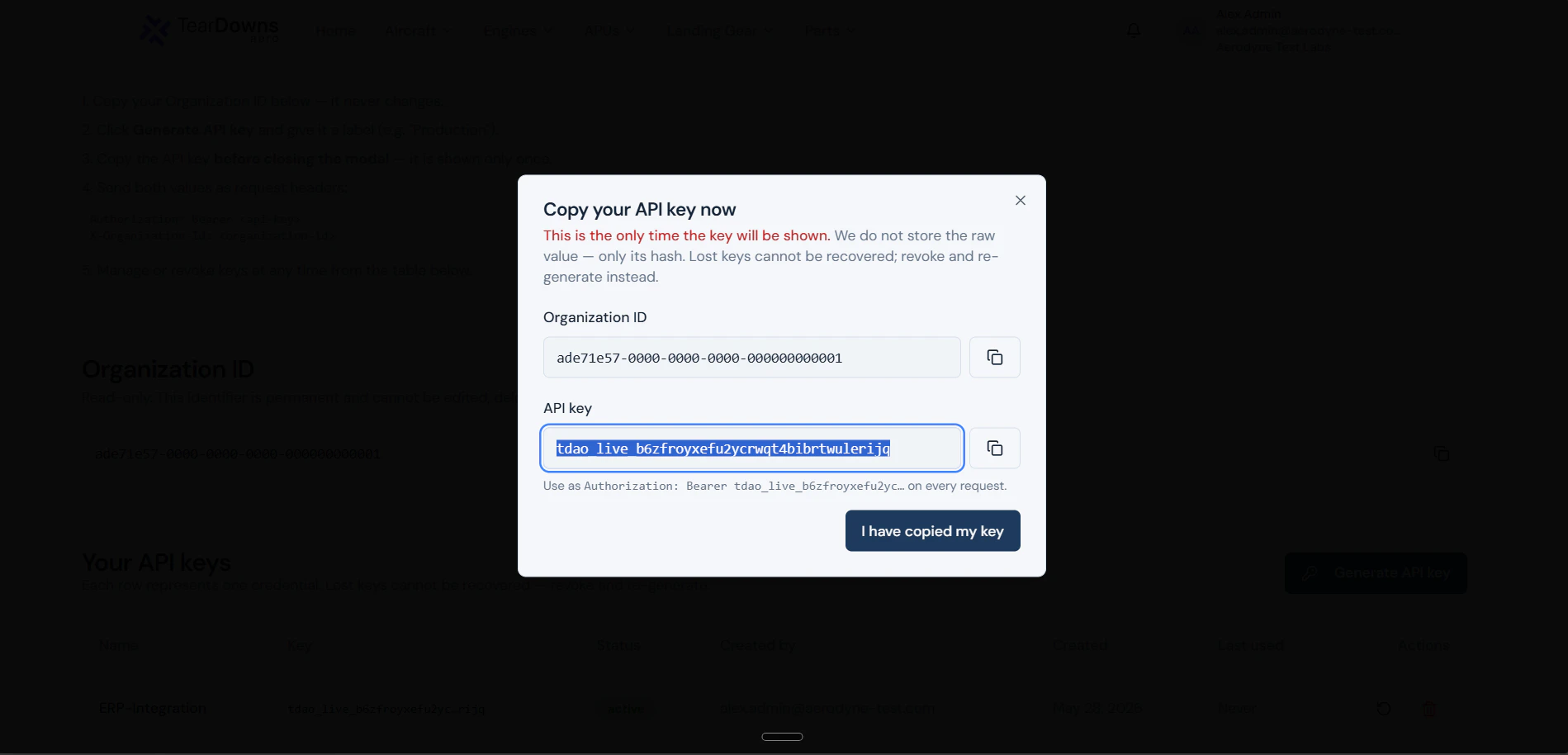 **4. Confirm the copy and the new row in the keys table.**
Closing the reveal returns you to the keys table. The new row shows
the label, the prefix + last-four, the active status badge, and the
Rotate / Revoke actions. The raw value never reappears.
**4. Confirm the copy and the new row in the keys table.**
Closing the reveal returns you to the keys table. The new row shows
the label, the prefix + last-four, the active status badge, and the
Rotate / Revoke actions. The raw value never reappears.
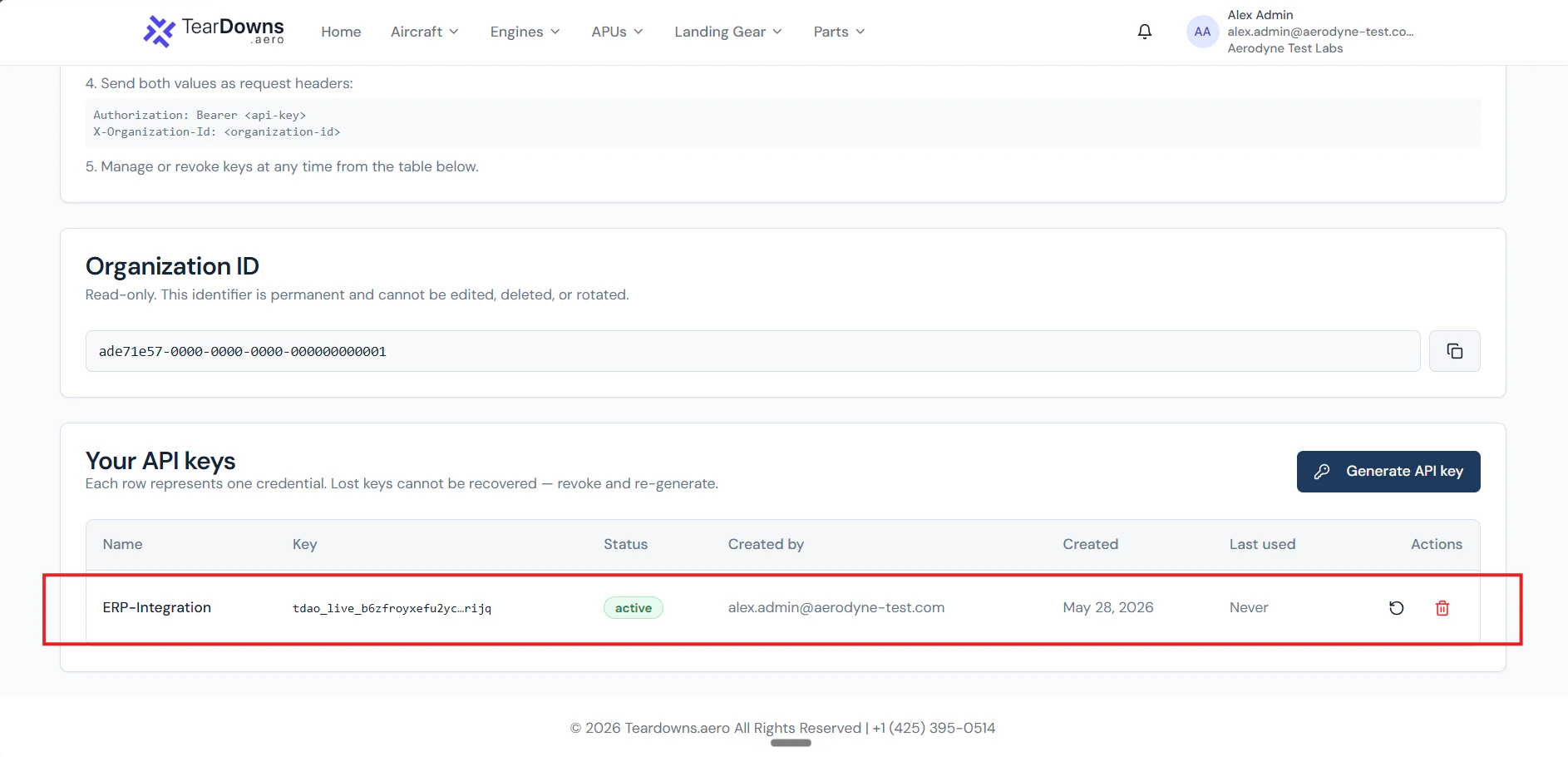 Send as `Authorization: Bearer tdao_live_…` on every call. Always
pair with `X-Organization-Id`.
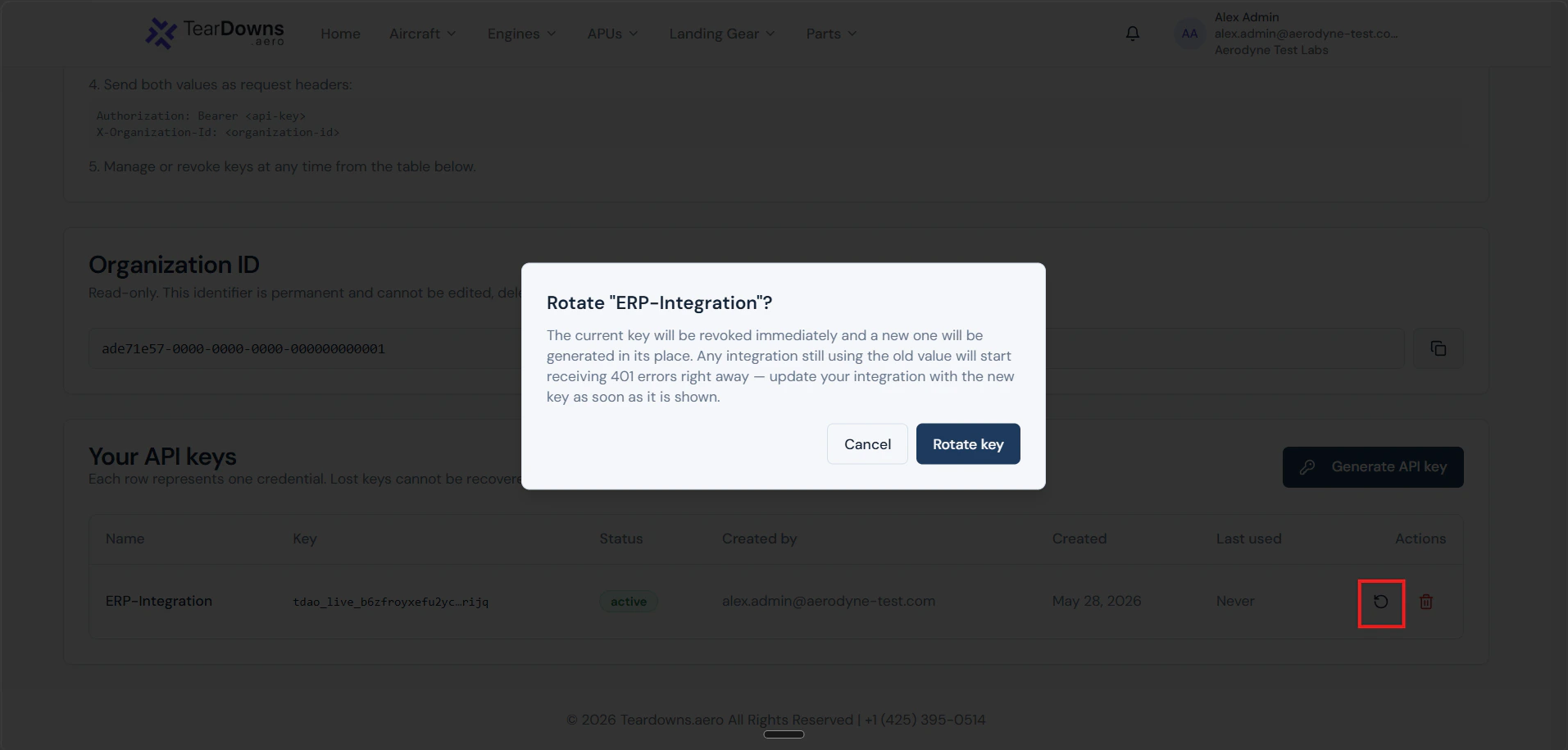
Click "Rotate" on a key. The old value is revoked atomically and a
new value is shown **once**. Old in-flight requests using the
pre-rotation token complete normally; the next request gets
`401 invalid_api_key`. Update your secrets store before the rotation
completes for zero downtime.
Send as `Authorization: Bearer tdao_live_…` on every call. Always
pair with `X-Organization-Id`.
Click "Rotate" on a key. The old value is revoked atomically and a
new value is shown **once**. Old in-flight requests using the
pre-rotation token complete normally; the next request gets
`401 invalid_api_key`. Update your secrets store before the rotation
completes for zero downtime.
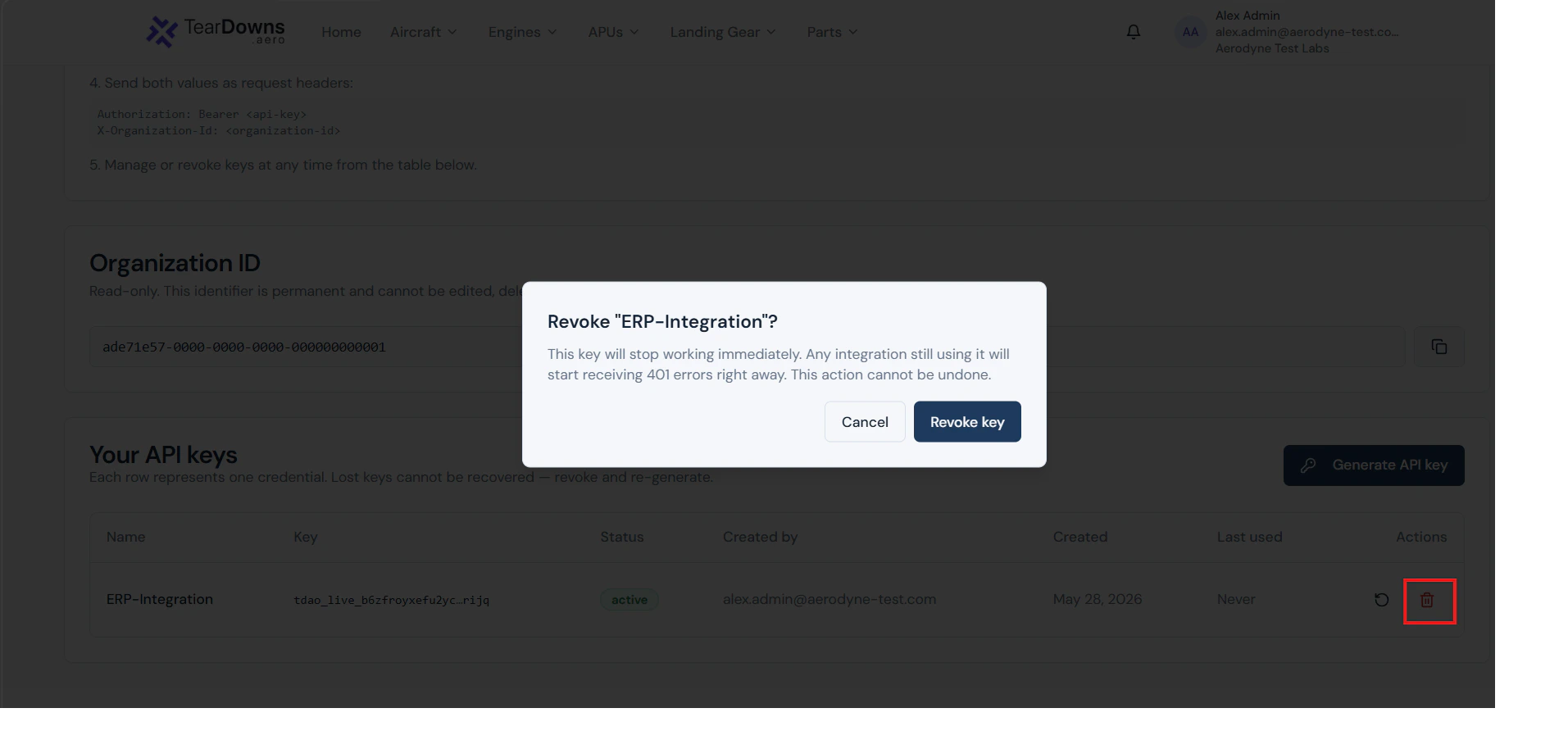
 Click "Revoke". The key becomes inactive immediately. Use this when
a key has leaked, when its integration is decommissioned, or when
the user who minted it leaves the org.
Click "Revoke". The key becomes inactive immediately. Use this when
a key has leaked, when its integration is decommissioned, or when
the user who minted it leaves the org.
 ## What's stored
Only the SHA-256 hash of the raw key lives in the database. Three
visible-to-you fields help you identify a key in your settings list
without exposing the secret again:
| Field | Example | Purpose |
| ----------- | ------------------------- | ------------------------------------ |
| `name` | `Production ERP` | Your label |
| `prefix` | `tdao_live_4heb622mfcous` | First 24 chars, shown in the UI list |
| `last_four` | `lr4w` | Last 4 chars of the random tail |
Together they're enough to recognise a key in logs ("our `Production
ERP` key, prefix `…cous`, ending `lr4w`") without leaking material.
## When a key stops working
Order matters. From the validation pipeline, in the order checks happen:
1. **Format wrong** → `401 missing_or_malformed_authorization`. Token
doesn't start with `Bearer tdao_live_`.
2. **Hash not found** → `401 invalid_api_key`. Includes the
never-existed case AND the revoked case.
3. **Expired** → `401 api_key_expired`. Past its `expires_at`.
4. **Wrong org id in the header** → `403 organization_mismatch`.
5. **Org's account/subscription bad** → `403 org_inactive` /
`org_churned` / `subscription_required`.
6. **Org's API access toggle off** → `403 api_access_disabled`.
7. **Minter is no longer active** → `403 api_key_creator_revoked`.
8. **Minter lost the required capability** → `403
insufficient_capability`.
The first failing check wins we don't tell you about the others.
## Best practices
* **One key per integration.** Mint a separate key for each ERP, each
CI job, each downstream consumer. When one rotates, the others are
unaffected.
* **Store in a real secrets manager.** Environment files in source
control are a leak waiting to happen. Use Vault, AWS Secrets Manager,
Doppler, GCP Secret Manager, or your platform's equivalent.
* **Rotate when a maintainer leaves.** The user who minted the key is
re-checked per request; deactivating them in our system stops the
key. But a copy of the secret outside our system doesn't care.
Revoke + re-mint.
* **Don't share via Slack / email.** Use the secrets manager's "share"
feature. The raw value should never appear in chat history.
* **Watch your logs.** Sudden spikes in `401`s on `/public/v1/*` or any
`403 organization_mismatch` are security signals. Both are visible in
our audit logs as well as your own.
## What's stored
Only the SHA-256 hash of the raw key lives in the database. Three
visible-to-you fields help you identify a key in your settings list
without exposing the secret again:
| Field | Example | Purpose |
| ----------- | ------------------------- | ------------------------------------ |
| `name` | `Production ERP` | Your label |
| `prefix` | `tdao_live_4heb622mfcous` | First 24 chars, shown in the UI list |
| `last_four` | `lr4w` | Last 4 chars of the random tail |
Together they're enough to recognise a key in logs ("our `Production
ERP` key, prefix `…cous`, ending `lr4w`") without leaking material.
## When a key stops working
Order matters. From the validation pipeline, in the order checks happen:
1. **Format wrong** → `401 missing_or_malformed_authorization`. Token
doesn't start with `Bearer tdao_live_`.
2. **Hash not found** → `401 invalid_api_key`. Includes the
never-existed case AND the revoked case.
3. **Expired** → `401 api_key_expired`. Past its `expires_at`.
4. **Wrong org id in the header** → `403 organization_mismatch`.
5. **Org's account/subscription bad** → `403 org_inactive` /
`org_churned` / `subscription_required`.
6. **Org's API access toggle off** → `403 api_access_disabled`.
7. **Minter is no longer active** → `403 api_key_creator_revoked`.
8. **Minter lost the required capability** → `403
insufficient_capability`.
The first failing check wins we don't tell you about the others.
## Best practices
* **One key per integration.** Mint a separate key for each ERP, each
CI job, each downstream consumer. When one rotates, the others are
unaffected.
* **Store in a real secrets manager.** Environment files in source
control are a leak waiting to happen. Use Vault, AWS Secrets Manager,
Doppler, GCP Secret Manager, or your platform's equivalent.
* **Rotate when a maintainer leaves.** The user who minted the key is
re-checked per request; deactivating them in our system stops the
key. But a copy of the secret outside our system doesn't care.
Revoke + re-mint.
* **Don't share via Slack / email.** Use the secrets manager's "share"
feature. The raw value should never appear in chat history.
* **Watch your logs.** Sudden spikes in `401`s on `/public/v1/*` or any
`403 organization_mismatch` are security signals. Both are visible in
our audit logs as well as your own.